<h3>How do I access my Family Learning Plan?</h3>
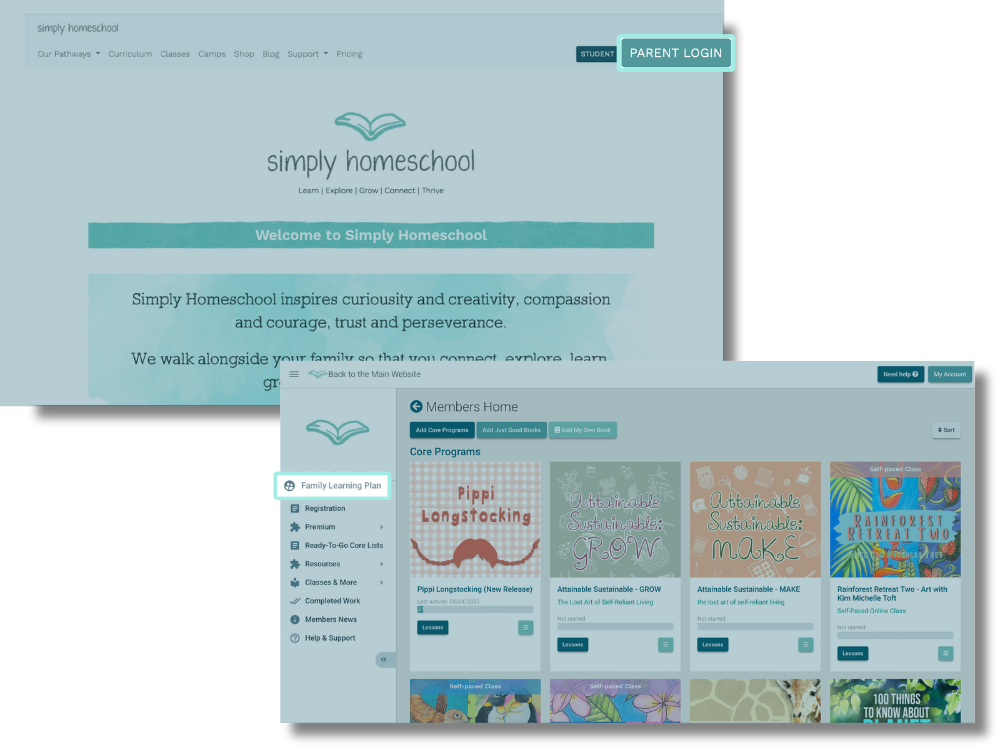
<p><span data-contrast="auto">If you are NOT logged in, you can access your Family Learning Plan via the Parent Login.</span><span data-ccp-props="{&quot;134233117&quot;:true,&quot;134233118&quot;:true}">&nbsp;</span></p>
<p><span data-contrast="auto">If you ARE logged in, you can access via the Family Learning Plan button. Depending on the size of your browser window, it will either be:</span><span data-ccp-props="{&quot;134233117&quot;:true,&quot;134233118&quot;:true}">&nbsp;</span></p>
<ul>
<li><span data-contrast="auto">In the&nbsp;left hand&nbsp;menu,</span><span data-ccp-props="{&quot;134233117&quot;:true,&quot;134233118&quot;:true}">&nbsp;</span></li>
<li><span data-contrast="auto">Or there will be a button in the top right of the webpage</span><span data-ccp-props="{&quot;134233117&quot;:true,&quot;134233118&quot;:true}">&nbsp;</span></li>
</ul>
<p><img alt="Login" style="width: 1000px; display: block; margin-left: auto; margin-right: auto;" title="Login" src="/export/sites/simplyhomeschool/images/Login.png" /></p>